China visa photo background
What to check when preparing your China visa photo: size, background, and file requirements.
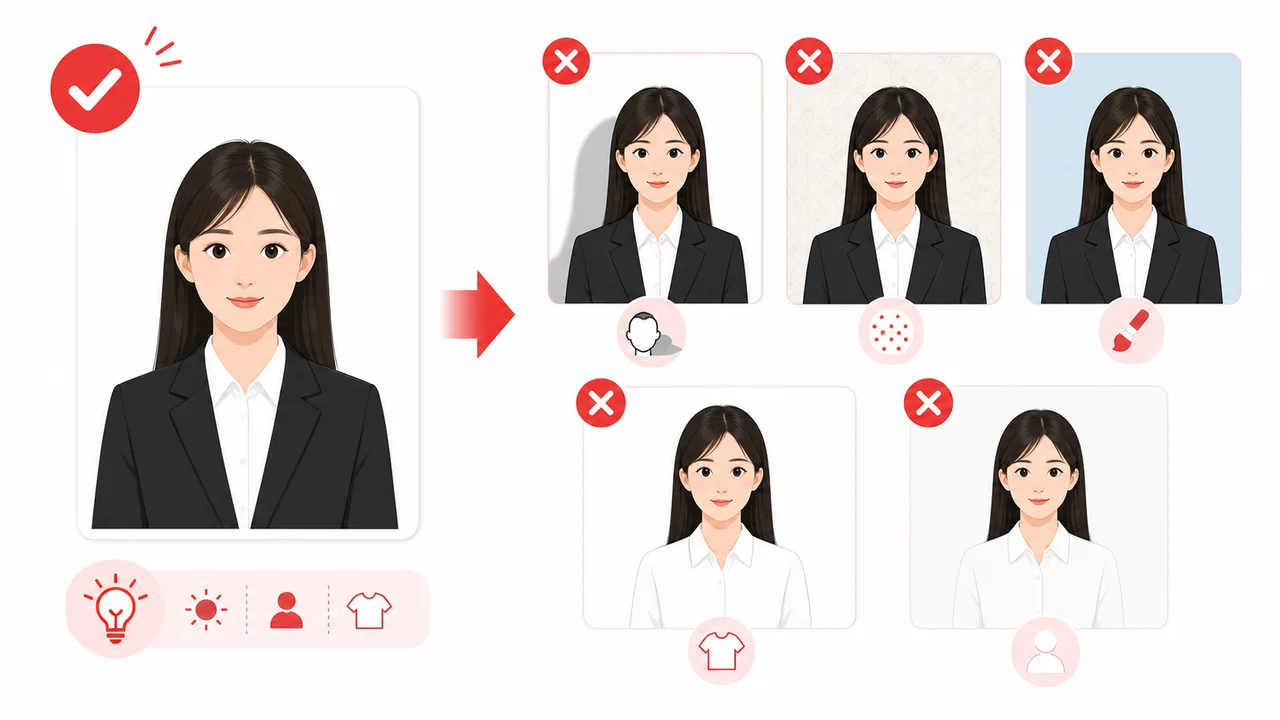
The photo conditions to check first
- Plain white or near-white, no shadows
- A China visa photo requires a plain white or near-white background with no shadows.
- Printed and digital photo requirements may differ depending on the application route and center.
The background should be plain white or near-white
China visa photo guidance expects a plain white or near-white background without shadows, patterns, furniture, or wallpaper texture. Even a white wall can create a visible head or shoulder shadow if the person stands too close to it.
If you correct the background digitally, keep the result natural. A cut-out edge around hair or shoulders can make the image look edited and may work against the purpose of identity confirmation.
- Use a plain white or near-white wall
- Avoid shadows behind the head and shoulders
- Do not over-edit the background edge
White clothing can disappear into the background
Very light clothing can blend into a white background and make the body outline harder to see. A darker top usually gives clearer separation while keeping the photo simple.
Move slightly away from the wall, use even front lighting, and keep objects out of the frame before taking the photo.
Create your photo in the browser
Prepare the photo for China Visa directly in your smartphone or computer browser. Creating and reviewing are free.
Open the web toolWhat this tool creates
- the required face photo (for digital upload)
Also available as an iPhone appOpen the App Store
Check before you apply
Check the COVA upload screen and the embassy, consulate, or visa center instructions for your actual application route.
Photo conditions that can cause problems
Check these photo conditions before you submit. Getting them right during the shoot saves a retake later.
-
Shadows on Face or Background
Uneven lighting or standing too close to the wall can create shadows. Ensure soft, even lighting with no shadows on the face or behind the head.
-
White Clothes on White Background
Avoid white or very light clothing because it can blend into the white background. Darker clothing provides clearer separation.
How the App Helps You Prepare Your Photo
On-Screen Template Guide
Align your face with the official guide lines to easily meet the strict height and width specifications.
Background Check & Guidance
Check whether the background is plain white or near-white, with no shadows. It is safest to take the photo in front of a white wall from the start. If you use a background cleanup feature, use it carefully and verify the final image looks natural.
COVA-Style JPEG Export
Export a JPEG sized for COVA's digital upload requirements — the exact pixel and file-size targets are in the table above. Final acceptance depends on the COVA upload check, visa center, embassy or consulate.
Privacy First Processing
All image adjustments are processed entirely on your device. Your photos are never sent to a server.
Note: shoumei.org is an independent photo formatting tool to assist in preparation. It is not affiliated with COVA, the Ministry of Foreign Affairs of China, any Chinese embassy or consulate, or any visa application center. It does not submit visa applications or guarantee acceptance.
Frequently Asked Questions
What background is required?
Plain white or near-white with no shadows, patterns, or objects. Take the photo in front of a white wall with even lighting.
Can I change the background after taking the photo?
The safest approach is to photograph in front of a white or near-white wall from the start. Background cleanup tools sometimes leave edge artifacts, and a replaced background does not guarantee acceptance.
Can I wear white clothes?
It is better to avoid them. Light clothing can blend into a white background, so darker colors give clearer separation.
What conditions can cause a China visa photo to be rejected?
Background shadows, hair covering the eyebrows or eyes, glasses with thick frames or glare, white clothing blending into the background, incorrect head dimensions, a file size outside the official range, or a photo older than 6 months.
Where these requirements come from
- COVA - China Online Visa Application photo upload Checked: 2026-06-29
- VisaForChina - Photo requirements FAQ Checked: 2026-09-03
- Consulate-General of China in Los Angeles - Photo Requirements Checked: 2026-06-29