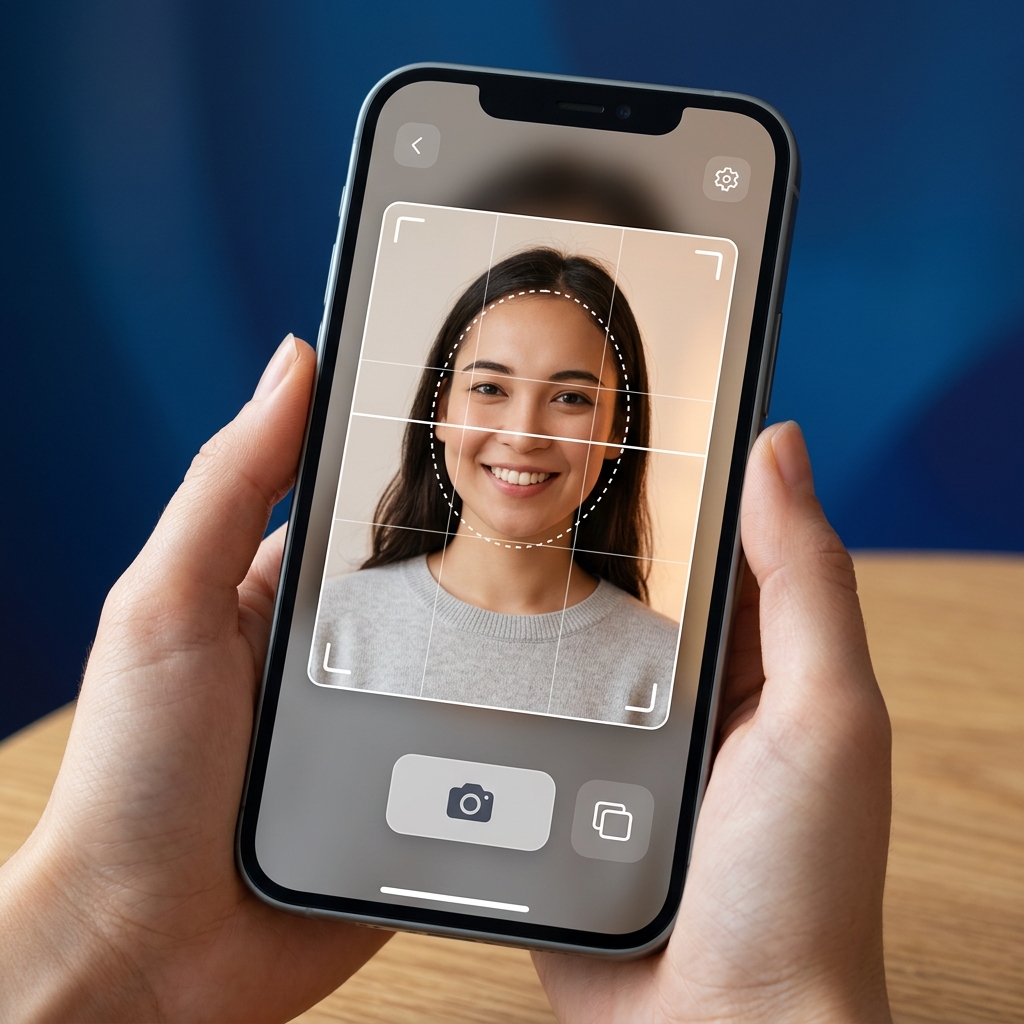
The photo requirements to check first
- Schengen visa photos are most commonly 35 × 45 mm, but the exact size depends on your destination, application country, jurisdiction, and provider.
- The background should usually be plain, light (white or light grey), and evenly lit.
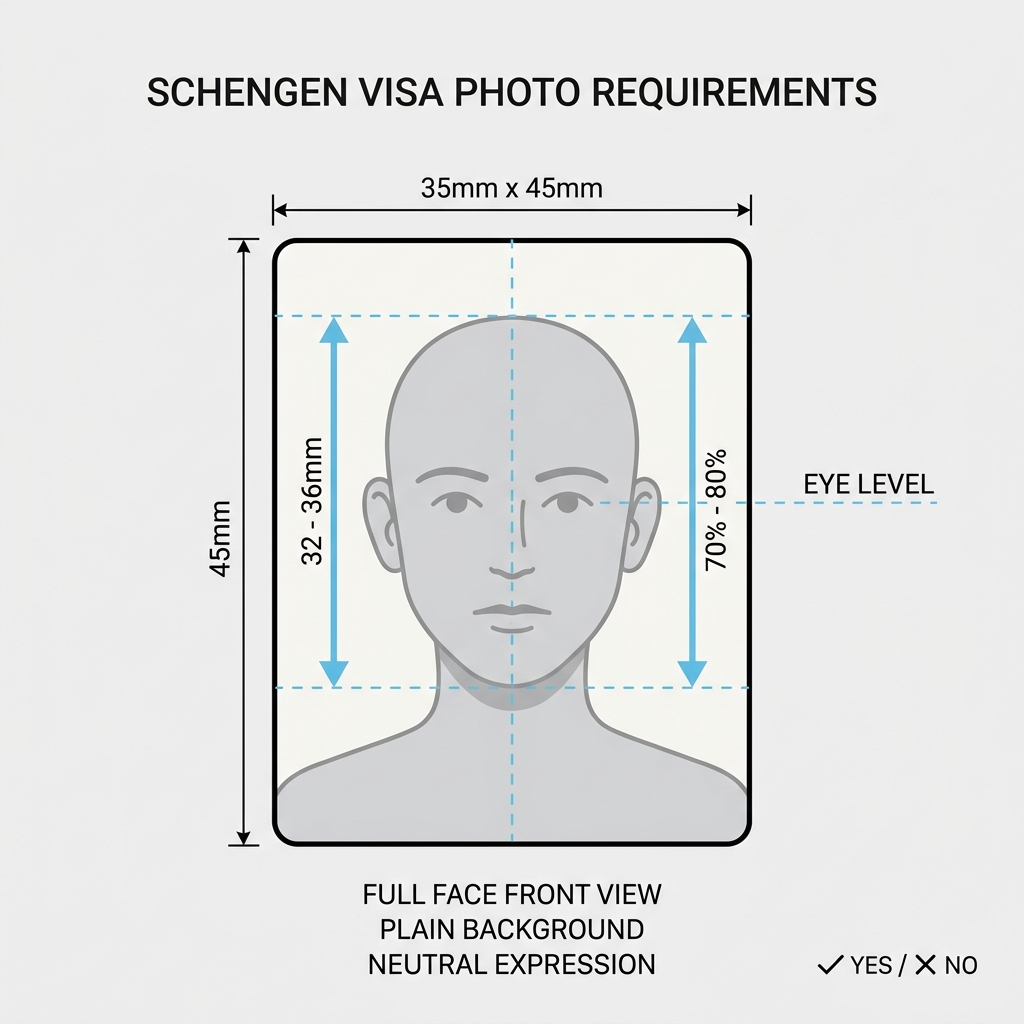
- The applicant's face should be centered, clearly visible, and occupy 70–80% of the photo.
- Photo requirements can vary by embassy, consulate, country, or visa application center.
- Spain's BLS US tourist route is one exception: it requires 2 × 2 inch (51 × 51 mm) photos; other routes, such as Finland (36 × 47 mm), have their own specs, and some routes take the photo at the appointment.
- shoumei.org helps prepare photo files, but it does not submit visa applications and is not an official government service.
What is a Schengen Visa Photo?
A Schengen visa photo is a passport-style photo required for travelers applying for entry into any of the Schengen Area countries in Europe. It must comply with ICAO (International Civil Aviation Organization) specifications. The most common format is the standard size, but the exact size depends on your destination, application country, jurisdiction, provider (VFS/TLScontact/BLS), and submission method — and some routes take the photo at the appointment instead.
Official Sources First
Always check the specific guidelines from the official embassy, consulate, or authorized visa center (like VFS Global, TLScontact, or BLS International) of your destination country. Requirements may differ based on local submission policies, digital portal specifications, and application location.
! Some requirements are not fully confirmed Last checked: August 20, 2026
Some requirements are not fully confirmed
Some requirements could not be fully confirmed from official sources. Check the official guidance before you apply.
The standard size specifications summarized on this page were checked against official sources on August 20, 2026. Requirements vary by destination, application route, and provider, and for some destinations the official information is incomplete or conflicting. Always confirm the requirements for your specific application route.
Schengen Visa Photo Requirements Summary
A quick summary of the standard photo specifications for Schengen visa applications. Use this checklist as a general reference.
| Photo Type | Standardized passport-style color photo |
|---|---|
| Digital Dimensions | Varies by portal (e.g., minimum 300 dpi, aspect ratio 3.5:4.5) |
| Print Size | 35 × 45 mm (most common; varies by route) |
| Background | Plain, light-colored (white, off-white, or light grey) |
| Face Position | Centered, looking straight ahead, neutral expression |
| Head Size (Height) | 70% to 80% of the photo height (32–36 mm) |
| Expression | Neutral, eyes open, mouth closed (no smiling) |
| Glasses | Not recommended. If worn, eyes must be clearly visible with no glare, reflections, tinted lenses, or frames covering the eyes. |
| Head Covering | Only for religious or medical reasons; face must be fully visible |
| File Format | JPEG / JPG (typically) |
| File Size | Usually under 240 KB for digital uploads (varies by portal) |
| Recency | Taken within the last 6 months |
Schengen Visa Photo vs. Passport Photo
Understanding how Schengen visa photos compare to other standard passport-style photos.
Varies by application route
Schengen visa photo size depends on your destination, application country, jurisdiction, and provider. The standard size is the most common format, but some routes differ — for example, Finland specifies its own size, and the Spain BLS US tourist route requires its own square format.
Routes where no photo is needed
On some routes the photo is taken at the appointment, so you do not need to prepare one in advance — for example, Norway, or the Netherlands via an external provider. The app tells you when shoumei.orglies to your route.
Strict Recency Rules
Visa photo rules are often checked more strictly than those for passport renewals. The photo must represent your current appearance and be no older than 6 months.
How to Prepare a Schengen Visa Photo on Your Phone
Take or choose a recent face photo with good lighting.
Use a plain, light background (white, off-white, or light grey).
Align your face with the on-screen guide in the app.
Crop the photo to the size confirmed for your application route.
Export the print-ready sheet or digital upload-ready file.
Check the latest official instructions from the embassy or visa center before submitting.
Common Schengen Visa Photo Mistakes to Avoid
Many visa applications are delayed or rejected due to minor photo errors. Avoid these common mistakes:
Wrong size for your route
Using a size that does not match your application route — for example, a standard-size photo where your route requires a different size, or vice versa. The app confirms the size for your route.
Face Too Large or Small
If the head height is not between 70% and 80% (32–36 mm) of the photo height.
Non-Neutral Background
Backgrounds with patterns, textures, household objects, or strong color variations.
Shadows on Face or Background
Uneven lighting causing shadows across the face, nose, or background.
Reflections on Glasses
Glare or thick frames obscuring the eyes. Removing glasses is highly recommended.
Hair Covering the Face
Hair covering the eyes, eyebrows, or ears, which can affect facial recognition.
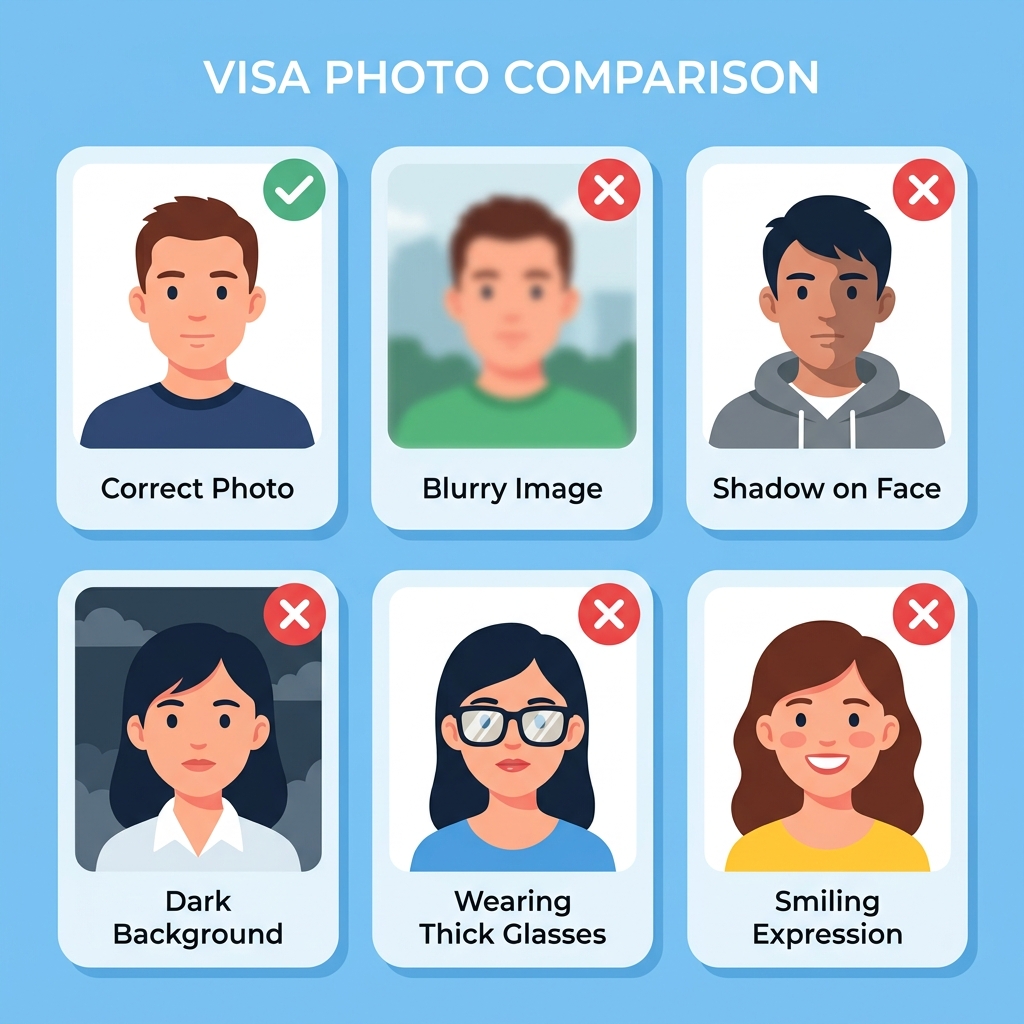
Before you submit
Before saving or submitting your photo, review the most common points of failure.
If you are unsure, you can create and check your photo with a preparation tool.
Why Use the Schengen Visa Photo App?
Precise Face Position Guide
Align your eyes, head, and chin easily with the interactive overlay guide.
Route-matched sizing
Format your photo to the size confirmed for your application route — commonly the standard size, with route-specific sizes such as Finland's or the Spain BLS US tourist square format where applicable.
Print Layout Formatting
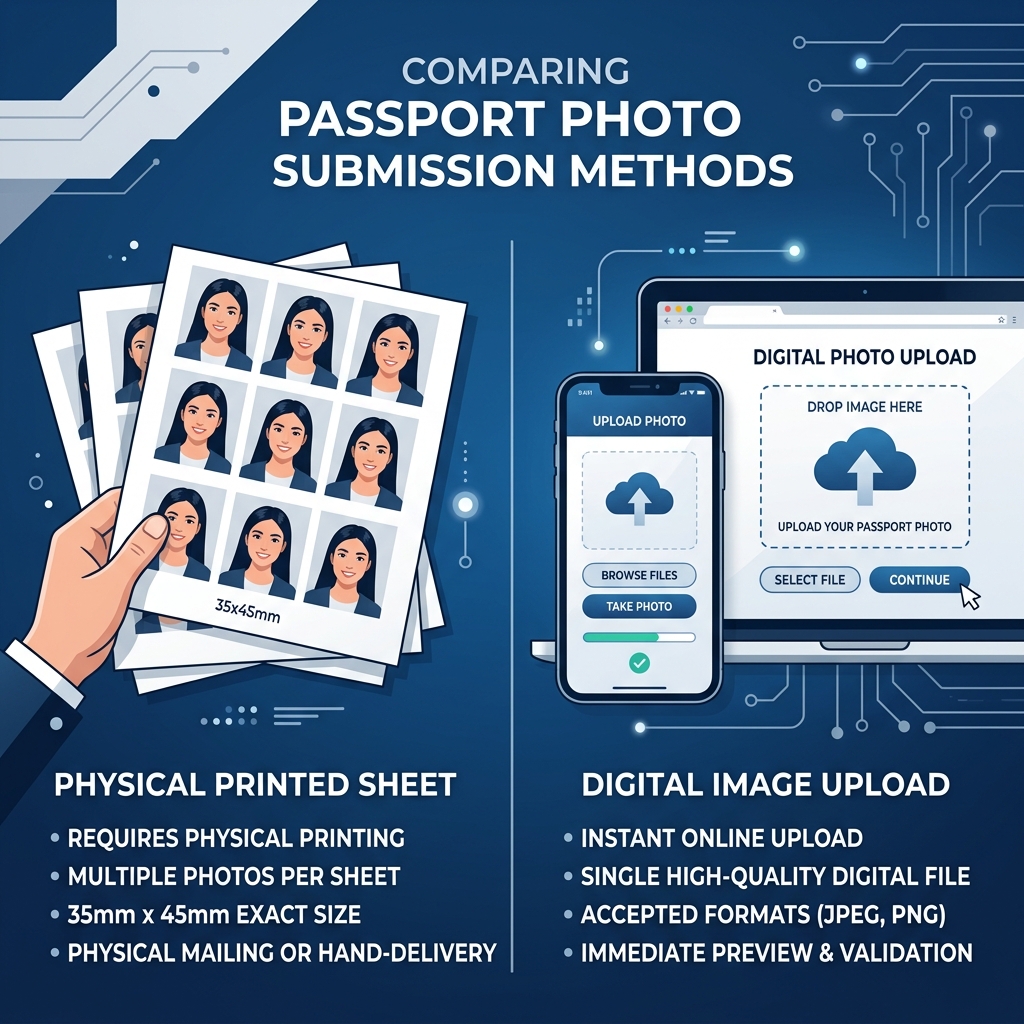
Save a 4 × 6 inch or L-size layout formatted for local printing at actual size.
On-Device Processing for Privacy
Your personal photo remains securely on your iPhone and is never sent to a server.
Note: shoumei.org is a helper tool to prepare your photo files. It does not submit your visa application and does not guarantee official approval. Always consult the official guidelines from the relevant embassy, consulate, or visa application center.
Frequently Asked Questions
What are the Schengen visa photo requirements?
The most common requirement is a 35 × 45 mm photo, taken within 6 months, against a plain light background, with your face centered and occupying 70–80% of the image, neutral expression, and eyes open. However, the exact size can vary by destination, application country, jurisdiction, and provider — the app confirms the spec for your route.
What size is a Schengen visa photo?
The most common physical size is the standard format, but the exact size depends on your destination, application country, jurisdiction, and provider. For example, Finland specifies its own size, and the Spain BLS US tourist route requires its own square format. For digital uploads, pixel requirements vary by portal.
Is 35 × 45 mm always required for Schengen visas?
The standard size is the most common format, but it is not universal. The size depends on your destination, application country, jurisdiction, and provider. For example, the Spain BLS US tourist route requires its own square format, and Finland specifies its own size. The app confirms the size for your route.
Why does Spain from US use 2 × 2 inch photos?
On the Spain tourist visa route applied through BLS centers in the United States, US passport-size photos (2 × 2 inch / 51 × 51 mm) are required instead of the standard size. This is specific to that provider and visa category, not all Spain or all US applications. The app confirms whether your route needs this size.
Can I take a Schengen visa photo with my phone?
Yes, you can take a photo with your phone and use shoumei.org to crop and format it. Ensure you have good lighting, a plain background, and follow all official face alignment rules.
Do Schengen visa photos need a white background?
A white or light grey background is generally required. The background must be completely plain, evenly lit, and free of any shadows, patterns, or objects. Take the photo against a real background rather than replacing it digitally.
Can I wear glasses in a Schengen visa photo?
Glasses are not recommended. Removing them is the safest option. If you must wear them, your eyes must be clearly visible with no glare, reflections, tinted lenses, or frames covering the eyes.
Can I adjust the background for my visa photo?
No. Background replacement is not recommended. Take your photo against a plain white, off-white, or light grey background. Digitally replacing the background may result in rejection.
Do all Schengen countries use the same photo requirements?
Most routes use the common size and ICAO rules, but the exact spec depends on destination, application country, jurisdiction, and provider. Some routes differ — for example, Finland (its own size) or the Spain BLS US tourist route (its own square format) — and some routes take the photo at the appointment. Digital upload specifications also vary by portal.
Do I need a printed photo or a digital photo?
It depends on the application center. Many require printed photos at your appointment, while some modern portals require a digital upload first. Check official guidelines for your specific application.
Can I use a passport photo for a Schengen visa?
Only if the passport photo meets the Schengen requirements for your specific route, including the correct size and being taken within the last 6 months. A US passport photo does not meet the common Schengen format, but matches the Spain BLS US tourist route requirement.
What are common reasons a Schengen visa photo may be rejected?
Common rejection reasons include incorrect dimensions, head too large/small, smiling or frowning, poor lighting/shadows, glasses glare or frames covering eyes, patterned or dark backgrounds, and excessive digital editing.
Does shoumei.org submit my visa application?
No, shoumei.org is only a tool to help you prepare your photo files. You must submit your application yourself through the official government portal or authorized visa center.
Is this an official Schengen visa app?
No, shoumei.org is an independent helper tool. It is not affiliated with any government, embassy, consulate, or official visa application center like VFS Global, TLScontact, or BLS International.
Does shoumei.org guarantee acceptance?
No. shoumei.org helps format your photo based on published specifications, but acceptance is determined by the embassy, consulate, or visa center. Requirements may change, so always check the latest official guidance.
Are my photos uploaded to a server?
No. All photo processing happens entirely on your iPhone. Your photos are never uploaded to any server.
Should I check official requirements before submitting?
Yes, you should always check the latest photo and submission instructions directly from the embassy, consulate, or visa application center of the country you are applying to.
Create your photo in the browser
Prepare the photo for Schengen Visa Photo directly in your smartphone or computer browser. Creating and reviewing are free.
The photo specification this tool creates depends on your destination country and application route. Select your route in the tool.
Open the web toolPrepare your Schengen visa photo on your phone
Create photo files for common Schengen visa requirements using your iPhone. Formatted for printing or digital export.
Download on the App Store