Korea travel photo preparation
K-ETA and Korea visa photo background and face position
A technically small JPG can still be weak if the face is hard to verify.
Checked: 2026-07-08
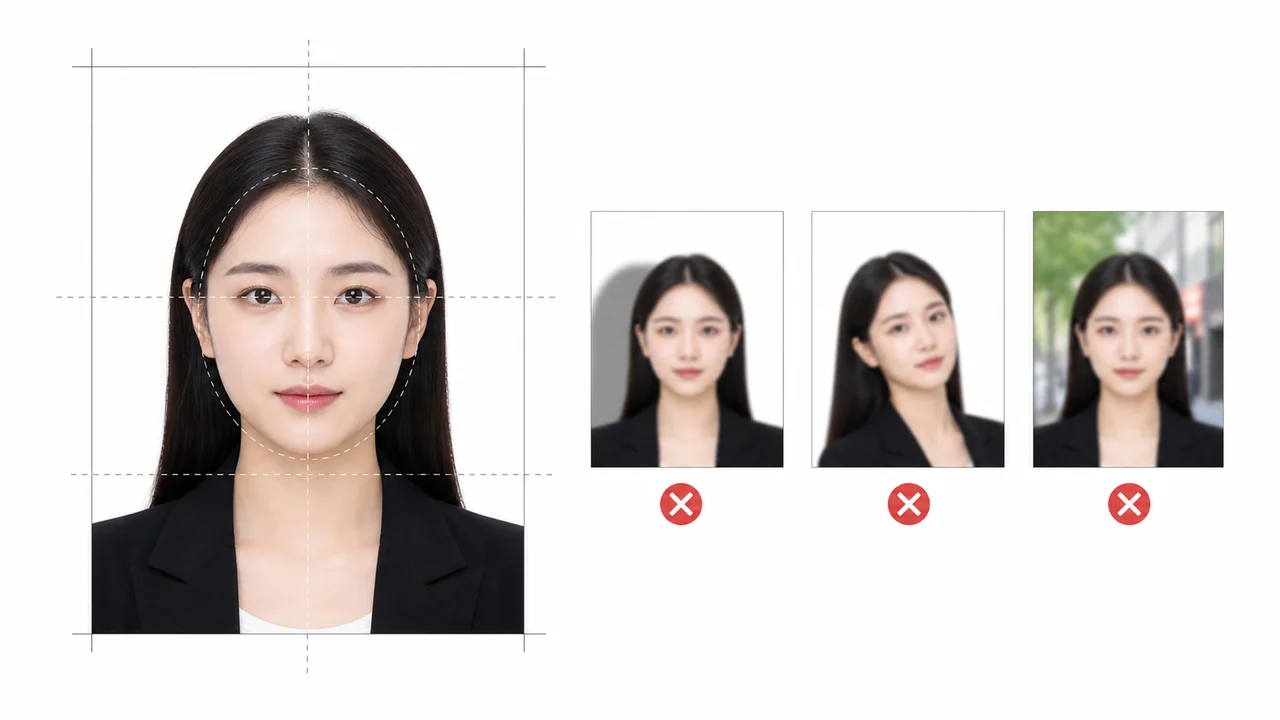
The photo conditions to check first
- Use a plain light or white background with even lighting.
- Keep the full face visible, centered, and front-facing.
- Avoid glasses glare, hats, masks, heavy filters, and hair covering the eyes.
Background: plain is safer than “almost plain”
A white wall with shadows, wallpaper texture, furniture, or a door line can still look busy after compression. Stand away from the wall and use soft front lighting so the background stays even.
If the photo needs background cleanup, keep the edit natural. Sharp artificial edges around hair or shoulders can make the image look manipulated.
Face visibility matters more than styling
The purpose of the photo is identity confirmation. Keep the head straight, eyes visible, mouth neutral, and face centered. Avoid sunglasses, tinted lenses, masks, hats, and strong cosmetic filters.
If glasses create glare or frames cover the eyes, retake the photo without them unless you have a specific reason to keep them.
- No strong shadow on the face
- No heavy beauty filter or AI identity change
- No cropped chin or hair top
- No tilted or side-facing pose
Create your photo with the iPhone appOpen the App Store
About official sources
The photo preparation information is based on public K-ETA guidance, Korea immigration notices, Korea visa e-Form document guidance, and Korea Visa Portal references. The content focuses on photo preparation only, not eligibility advice or application submission.
This website and app are independent photo file preparation tools. They are not affiliated with the Korean government, Korea Immigration Service, K-ETA, Korea Visa Portal, or any Korean diplomatic mission, and they do not guarantee photo acceptance, authorization, visa issuance, or entry.
Photo conditions that can cause problems
These failures tend to come from ordinary image problems, not complicated visa rules.
-
Oversized file
A phone photo can be several MB. Resize first, then compress, so the face remains sharp under the limit.
-
Wrong photo type
Do not upload a print sheet, a passport scan, or a photo of a printed photo when the portal expects a portrait file.
-
Weak identity visibility
Shadows, glare, heavy filters, hair over the eyes, or a tilted face can make identity confirmation harder.
Where the app helps
K-ETA crop
Exports a 600 x 600 px JPG for K-ETA-style upload limits.
On-device privacy
Photo processing happens on the iPhone; the app does not upload your image to a server.
Separate Korea visa route
Use the 35 x 45 mm Korea visa mode when your application needs a visa photograph rather than a K-ETA portrait upload.
The app prepares the photo file only. Submit your application through the official route and confirm the latest requirement before using the file.
FAQ
Does the background have to be pure white?
Use a plain white or very light background unless your current procedure states otherwise. Avoid patterns and shadows.
Can I wear glasses?
Glasses are risky if they create glare, tint, thick frames, or cover the eyes. Removing them is usually safer.
Can I replace the background digitally?
Light cleanup can help, but do not make the portrait look artificial or alter the face. Retaking on a better wall is often safer.
Official sources
- Korea Immigration / Ministry of Justice - K-ETA press release and FAQ Checked: 2026-07-08
- Embassy of the Republic of Korea - e-Form visa photo document guidance Checked: 2026-07-08